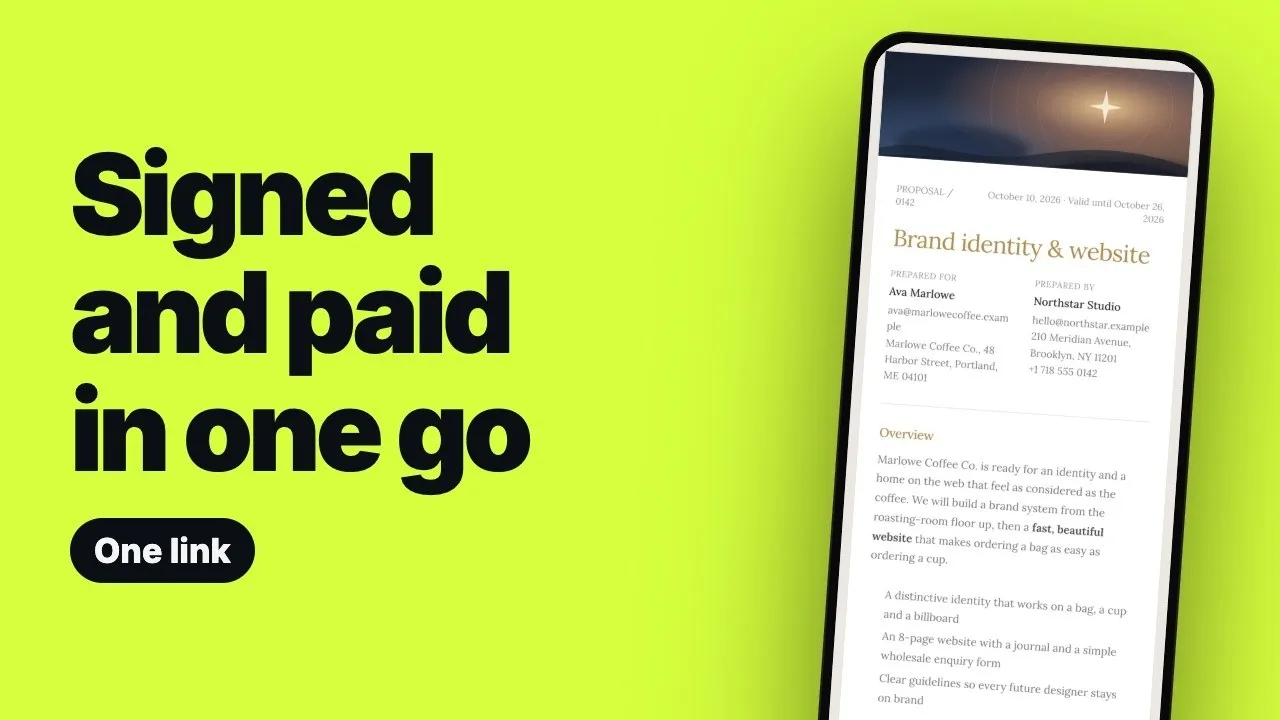
You can get a client booked, signed and paid from one link by putting the proposal, the deposit and the contract behind a single page. The client opens it, reads the scope and prices, ticks any optional extras, accepts with a signature, pays the deposit by card and signs the attached contract, all in one sitting. This guide covers the path step by step, how big the deposit should be, what to do if the client goes quiet, and exactly which Workspace369 plan does what. To compare tools before you commit, use the trial checklist.
What the client does, step by step
| Step | What the client sees | What you need to have set up |
|---|---|---|
| 1. Open the link | One scrolling page in your brand: cover, scope, prices, timeline, terms | A proposal with your theme, logo and colors |
| 2. Pick extras | Optional items they can tick; the total updates | Optional line items in the price list |
| 3. Accept | A typed or drawn signature | The proposal ready to send |
| 4. Pay the deposit | Card checkout for a percentage or a fixed amount | A deposit rule and Stripe connected |
| 5. Sign the contract | By default an email code to confirm identity, then e-sign consent and the signature field | A contract attached to the proposal |
| 6. Done | A signed copy by email to download | Optionally, an onboarding workflow switched on |
Card details are entered on Stripe’s checkout page, so you never handle them yourself.
Why the usual chain loses deals
The common sequence is a PDF proposal, then a separate signing tool, then an invoice, then a reminder email. Each step is a new link, often a new login, and each one asks the client to start over somewhere unfamiliar. Each one is a chance for the deal to stall, and while it stalls you are the one chasing instead of starting the work.
When the yes, the signature and the deposit happen together, work can begin right away. You also stop checking three tools to see who has actually paid. We did not measure how much faster this is; the argument is about removing handoffs, and you should judge it on your own deals.
Build the proposal page
Keep the page to what the client needs to decide: the outcome, the scope, the price and the first date. Say what is not included too; it saves an awkward conversation halfway through the project. Put the deposit in writing on the page so it is never a surprise at checkout.
- Brand. Pick a theme and your logo and colors carry across every page the client sees, which is what makes the link feel like yours rather than a tool’s.
- Scope and deliverables. List what is included and what is not, and highlight what matters most.
- Prices. Keep the list short. Three clear options are easier to choose from than ten.
- Timeline and terms. Include the first date and a valid-until date. For the full structure, see how to write a business proposal.
Let the client pick the extras
Extras do not need a second quote. Offer an add-on once, inside the price list, as an optional item. The client ticks it and the total updates on the spot, so the decision is theirs and you never have to send a revised document. Avoid burying extras in the scope text, where they read as hidden costs.
Accept, sign and pay the deposit
The client accepts with a typed or drawn signature and goes straight to checkout for the deposit. You choose the deposit as a percentage or a fixed amount, and you should check the figure the client will see before you send.
How big should the deposit be?
Big enough to cover your first stretch of work. If the project stops early, the deposit should leave you whole for what you have already done. A percentage and a fixed first payment both work as long as the figure is written down, and you should use the same figure in the proposal, the checkout and the contract. For what to do when the deposit or balance runs late, see how to get clients to pay on time.
The contract follows the yes
If you attached a contract, the accepted page sends the client straight on to sign it:
- By default, they confirm it is them with a six-digit code sent to their email. You can turn this off in your contract settings, and then anyone with the link can sign.
- They agree to use electronic records and signatures.
- They read the agreement and tap the signature field.
- They type or draw a signature, adopt it, then sign and finish.
- The signed copy is emailed to them and ready to download.
No printing, no scanning and no separate signing subscription. This is not legal advice; what goes in the agreement is for you and, where needed, a lawyer. See what to include in a freelance contract.
If the client goes quiet
A follow-up workflow can start when the proposal is sent, wait a couple of days, send an email and stop once the client accepts. You can edit the wait times and the emails to match how you work, so the reminder goes out on time without you writing it each week. Nothing runs until you switch the workflow on, so check every step first.
Then onboarding starts
When a client moves into the Onboarding stage, a workflow can send your welcome email and create the first task, once it is active. This is the part many people still do by hand. For what the welcome email and first week should contain, see the client onboarding process guide.
Selling sessions instead of projects: the booking page
If you sell sessions rather than projects, a public booking page covers the same idea. The client picks a service from your branded page, then a day and time that is free, sees the total and what is due now (for example, $90 due now of a $300 total), pays, and the booking is confirmed. A paid deposit often makes a booking firmer, and the service, time and booking land on your calendar.
Booking pages and client self-scheduling are a Specialist feature. They are not on Cadet or Voyager. If you are on a lower plan, the proposal, deposit and contract path above still works; you would arrange the session time with the client by message instead.
After the yes: the balance and the portal
When the balance is due, the client opens the invoice link, pays, and the invoice shows paid in full. Share the project to show progress, files and invoices in one portal; you choose whether its link opens for anyone who has it or asks the client to verify their email with a code first. The client portal needs no account, but it does ask the client to verify their email with a code; public proposal and invoice links need neither.
Which Workspace369 plan does what
Our #1 pick is Workspace369. The table reflects its plan data checked October 22, 2026, with seats per plan shown in the first row; confirm on the pricing page before you buy. Cadet through Commander start with a 14-day free trial, and a card is required to start.
| Capability | Cadet | Voyager | Specialist | Commander |
|---|---|---|---|---|
| Price billed monthly, per month | $29 (1 seat) | $74 (2 seats) | $149 (10 seats) | $299 (20 seats) |
| Price billed yearly, per month | $23.25 | $59.25 | $119.25 | $239.25 |
| Yearly total | $278.99 | $710.99 | $1,430.99 | $2,870.99 |
| Proposals with deposit on acceptance | Yes | Yes | Yes | Yes |
| Client acceptance and signature through a link | Yes | Yes | Yes | Yes |
| Contracts with e-signature | Yes | Yes | Yes | Yes |
| Invoices, payment links, deposit tracking | Yes | Yes | Yes | Yes |
| Email workflows | Up to 3 active | Up to 10 active | Up to 25 active | No listed cap on active workflows |
| Service packages and tiered pricing | No | Yes | Yes | Yes |
| Public booking pages, self-scheduling | No | No | Yes | Yes |
| Payment plans in installments, proposal revisions | No | No | Yes | Yes |
Limits worth knowing: SMS steps in workflows start on Voyager ($74 a month billed monthly), and late fees and AI-drafted workflows are on Commander ($299). Cadet has one seat; extra seats are $10 a month each from Voyager; Stripe must be connected to take card payments. The yearly totals are billed once a year.
Mistakes to avoid
- A deposit the client did not expect, or different deposit figures in the proposal, the checkout and the contract.
- Extras buried in the scope text rather than offered as ticks.
- A link you never opened on a phone, or a long price list.
Before you send the first one, send the link to yourself and walk through it as the client would. Set it up once, with your theme, a short price list with optional items, the deposit rule and the contract to attach, and every new client gets the same path from yes to paid.
Next step: send yourself the link
Build one proposal with a deposit rule and an attached contract, then open it on your phone as the client would. Compare plans on the Workspace369 pricing page, and read how to write a business proposal for the page content itself.
To run this on one real client, start the Workspace369 14-day free trial.
Frequently asked questions
Can a client sign and pay from the same link?
In Workspace369, yes: the client accepts the proposal with a signature, pays the deposit by card on Stripe’s checkout page and is then sent on to sign the attached contract. The signed copy is emailed to them.
Which Workspace369 plan do I need for this?
Proposals, deposit on acceptance and contract e-signature are on every plan, from Cadet at $29 a month billed monthly for one seat ($23.25 a month billed yearly), read October 22, 2026. Public booking pages and self-scheduling need Specialist at $149 a month billed monthly for 10 seats.
How big should the deposit be?
Large enough to cover your first stretch of work so that you are whole if the project stops early. Pick a percentage or a fixed amount and keep the figure identical in the proposal, the checkout and the contract.
Does the client need an account?
Public proposal and invoice links do not need one. The client portal does ask the client to verify their email, and by default contract signing uses a code sent to their email (you can turn it off), so some steps still involve their inbox.
What if the client goes quiet before accepting?
Switch on a follow-up workflow that starts when the proposal is sent, waits a couple of days, emails and stops when the client accepts. Nothing runs until you activate it. Cadet allows up to three active workflows.
Can I take a deposit when someone books a session?
Yes, with a booking page, which is available from Specialist at $149 a month billed monthly (10 seats). The client picks a service and time, sees what is due now, pays, and the booking is confirmed.